LHDN e-Invoice and MyInvois
Check MyInvois UUID and QR, TIN and SST registration numbers. Catch mapping mistakes before finance posts the invoice.

Home/AI for Accounting/Accounts payable
Supplier invoices still arrive by email, PDF and shared folders. Accounts payable automation can land those files in Microsoft 365, extract the fields with Azure AI, flag LHDN and SST issues, and export clean Excel or CSV data ready for your accounting or ERP system.
AP automation
This article explains a Microsoft 365 approach to accounts payable invoice automation for Malaysian companies: capture in SharePoint or email, extract with Azure AI, validate MyInvois and SST, review exceptions, then export Excel or CSV ready for popular ERPs.
In practice
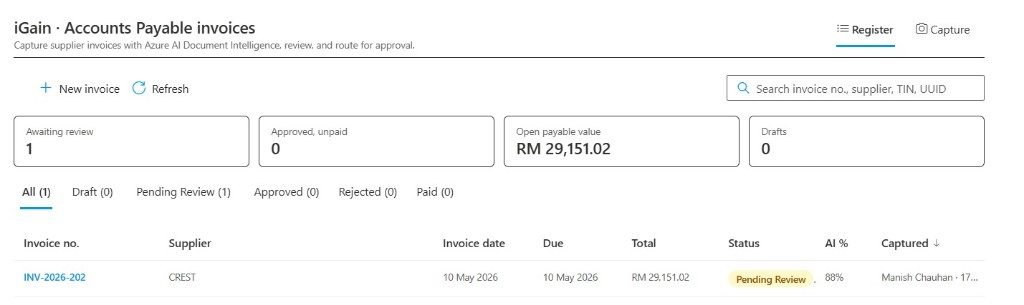
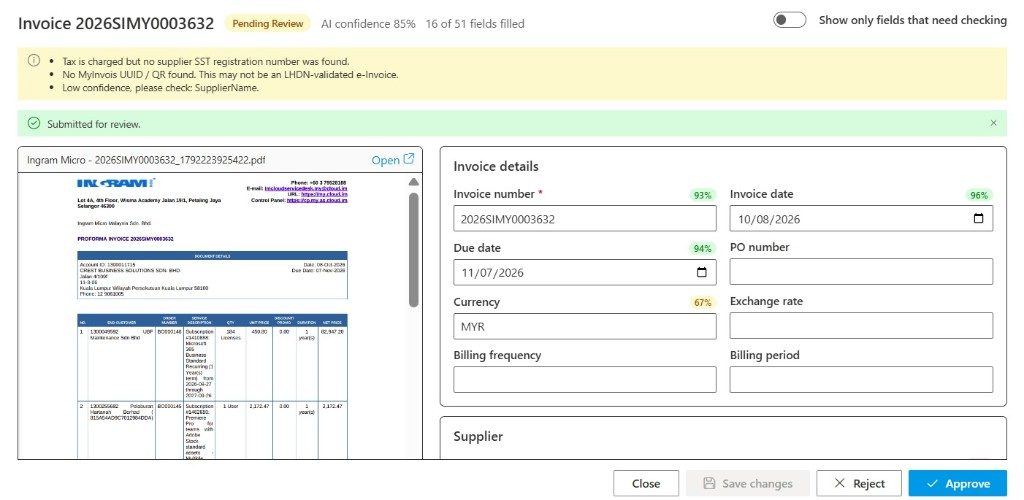
Finance sees every invoice in one register, then opens exceptions beside the original PDF - with confidence scores, SST and MyInvois warnings, and Approve or Reject.
How it works
Capture runs in Azure so it can watch folders overnight. SharePoint is the review and approval layer - not the OCR engine. Approved invoices export as Excel or CSV, ready for accounting and ERP import.
| Step | What happens | Runs in |
|---|---|---|
| 1. Landing | Invoices arrive in an AP Inbox library, shared mailbox (for example ap@company) or upload page. | SharePoint / Exchange |
| 2. Detect | SharePoint notifies the Function when a file is added; a timer job every 15 minutes catches anything missed. | Azure Function + Queue |
| 3. Claim | Status set to Processing with a lock so two workers never take the same file. Stalled jobs restart automatically. | Function + Graph |
| 4. Extract | Document Intelligence (prebuilt-invoice) maps fields, then LHDN/SST checks, duplicate check and confidence scores run. | Azure Function |
| 5. Output | One register row, file columns filled, JSON saved for audit. Status becomes Needs review or Ready. | Function + Graph |
| 6. File | Move to Processed/yyyy/mm or keep one library with Inbox / Processed / Exceptions views (configurable). | Function |
| 7. Review | SharePoint review screen for exceptions: PDF preview, editable fields, Approve or Reject. | SharePoint |
| 8. Export | Export approved invoices to Excel or CSV so the data is ready for your accounting or ERP system. | Function |
Export
Automation does not have to replace your ledger. It prepares clean invoice data that accounts can import into the system they already use.
Why Malaysia
Generic OCR is everywhere. Malaysian AP work also needs tax checks, duplicate control and an export your ledger can accept.
Check MyInvois UUID and QR, TIN and SST registration numbers. Catch mapping mistakes before finance posts the invoice.
Same supplier and invoice number, bank details that suddenly change, and amounts that do not add up are flagged for review.
Approved invoices leave as structured files ready for SQL Accounting, AutoCount, Business Central, SAP, NetSuite, Xero and other popular systems.
Invoices can stay in your tenant and Azure region. Limited SharePoint permissions and Key Vault secrets help IT sign off under PDPA.
Automated AP is judged on the invoices that go wrong. Retries, reprocess and a clear review UI keep the exception pile under control.
Once invoices sit in a structured register, teams can ask what they owe a supplier or which invoices are due this week.
Security
Related
FAQ
It is the process of capturing supplier invoices from SharePoint, email or upload, extracting fields with AI (such as Azure Document Intelligence), validating Malaysian tax details where needed, reviewing exceptions, and exporting structured data - usually Excel or CSV - so finance can post into their accounting or ERP system without re-keying.
In a well-designed Microsoft 365 design, processing runs in your own Azure and SharePoint environment. Invoices stay in your AP site, and Document Intelligence is called from a secure Function App with limited Sites.Selected permissions. That approach supports PDPA and internal security reviews.
It should. Malaysian checks include MyInvois UUID and QR data, TIN fields and SST registration numbers, and flag mismatches such as an SST number landing in the TIN field - so finance sees the warning before posting.
Export to Excel or CSV keeps the data ready for popular accounting and ERP systems used in Malaysia, including SQL Accounting, AutoCount, UBS Accounting, MYOB, QuickBooks, Xero, Sage, SAP Business One, Oracle NetSuite, Microsoft Dynamics 365 Business Central, Acumatica and Odoo. Your team imports or maps the file into the ledger they already run.
Plain OCR only reads text. Strong AP automation adds Malaysian validation (MyInvois, TIN, SST), duplicate checks, confidence scores, a review screen for exceptions, and a clean Excel or CSV export that accounts teams can use in their ERP.
Your AP team. High-confidence invoices can move straight to Ready; exceptions open beside the original PDF with editable fields, AI confidence per field, and Approve or Reject actions. A toggle can show only fields that need checking.
Common options are an AP Inbox SharePoint library, a shared mailbox such as ap@company, or an upload page. Azure automation watches for new files so capture can run overnight, not only while someone has a browser open.
Crest helps Malaysian organisations design Microsoft 365 and Azure-based accounts payable automation: licensing, Document Intelligence, SharePoint review, LHDN-related checks and Excel or CSV exports that fit the ERP you already use.
Tell Crest your monthly invoice volume and which ERP you use. We can map a Microsoft 365 and Azure design that exports Excel or CSV ready for your ledger.